Sharing Survey Data with PIN-Protected Links
Share your projects with e-mail + 6-digit PIN verified links: choosing duration, guest notes and automatic access expiry.
2026-08-17 · 5 min read
The common ways to hand over survey data are either insecure or unusable: dropping a 40 GB folder in cloud storage behind a public link, or asking the client to install software. PIN-protected sharing solves both — the recipient opens the data in a browser, but only after proving who they are, and access closes on its own.
Creating a link and adding recipients
The share dialog asks for three things: what, who and for how long.
What — pick the files and external layers to include. Measurement records tied to the layers you selected (measurements anchored to an orthophoto, 3D tileset and point cloud measurement bundles) are added to the package automatically; you do not tick them separately. WMTS/TMS external layers open read-only for the recipient, and their tile traffic counts against your quota.
Who — enter one or more recipient e-mail addresses and set a 6-digit PIN. You can give the link an optional name ("Contractor team — November review"); that name appears in your share lists and on notes, and recipients can see it too.
You can also share in analysis mode, dropping the recipient straight into the A/B comparison workspace. This mode requires the project to hold at least 2 analysis assets (added via the "Analysis" button in the map layer menu); otherwise the option stays disabled and says "At least 2 analysis assets are required". Folder shares have live scope — assets, measurements and layers added to the folder later flow into the active share automatically. In an analysis folder share the guest's only tool is pin/note; they cannot measure.
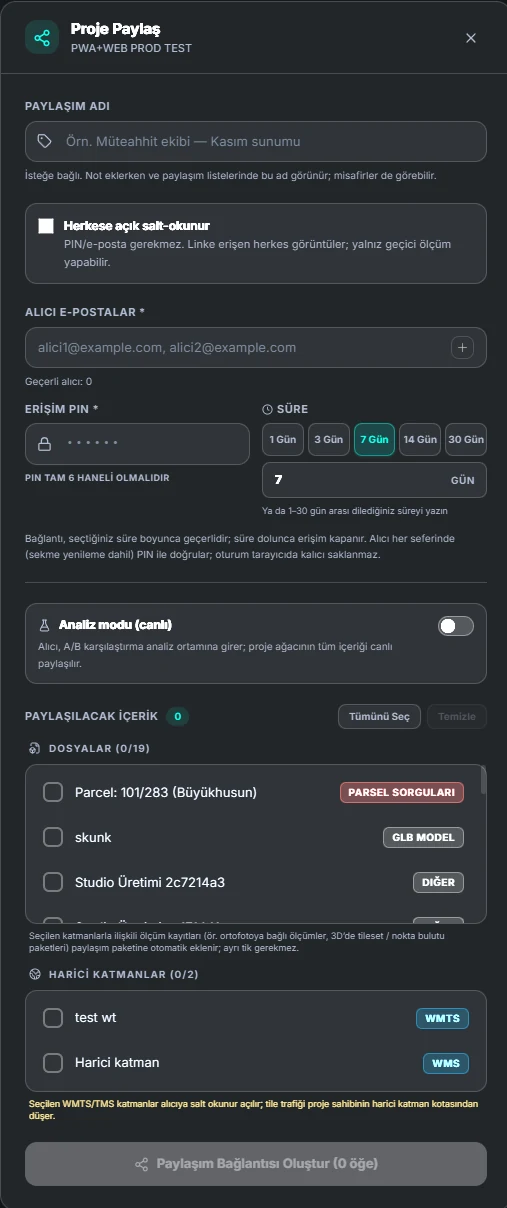
Choosing duration (1-30 days; 3 on free)
Preset durations are 1, 3, 7, 14 and 30 days; if you want something in between, type the number of days directly. When the window closes, the link stops working — there is nothing for you to do. A link that has not yet expired can be extended later from the Active share links panel; the link's total lifetime (counted from its creation) cannot exceed your plan's ceiling, and an expired or revoked link is not extended — you create a new one.
| Free | Professional | |
|---|---|---|
| Maximum duration | 3 days | 30 days |
| PIN-protected sharing | No (links are public) | Yes |
| Recipient e-mails | None | Many |
| Active links | 1 in total | Unlimited |
Send the link and the PIN through separate channels. Putting both in the same message removes most of the value the PIN was there to provide.
What the recipient sees
Opening the link asks for a name, an e-mail address and the 6-digit PIN. On success they get read-only access to the data — orthophoto, point cloud, 3D model, 360° content, all in the browser. Map shares also open on a phone; analysis and point cloud shares open on desktop only — on a phone the recipient sees the "This share opens on desktop" screen, copies the link and opens it on their computer.
Three security behaviours are worth knowing:
- Sessions are not persistent. The recipient re-enters the PIN every time, including after a tab refresh. No long-lived key is stored in their browser.
- Wrong PIN attempts are limited. The screen shows how many attempts remain; a link that reaches 30 failed attempts within a 60-minute window is temporarily locked. The lock is not permanent — it lifts by itself as the window slides, so someone who knows the link cannot shut your share down indefinitely by deliberately guessing wrong.
- Opens and failed attempts are logged, but the individual IP address is not stored. This is stated to the recipient on screen.
For cases where identity checks are unnecessary there is also a public read-only option: no PIN, no e-mail, anyone with the link can view and take ephemeral measurements. Do not use it for sensitive data.
Guest notes and measurements
Recipients are not passive viewers — they can work on the data. But there is a deliberate split between two kinds of output:
- Measurements are ephemeral. Distances, areas and elevations a guest takes belong to that session; they disappear when the tab closes and are never written into your project.
- Notes are persistent. A note a guest pins to a coordinate on the map is saved and becomes visible to you. So "the elevation at this corner looks wrong" lands directly on the data, with no screenshots or e-mail threads in between.
The asymmetry is intentional: a guest's exploratory measurements should not pollute your project, but what they say should not get lost.
Revoking a link
The Active share links panel lists every live link and lets you revoke one before it expires. Revocation is immediate — an open tab loses access on its next request.
You can also manage access per recipient: removing one person closes only their access while the others continue. Removing the last active recipient revokes the entire share, and the app asks for confirmation first — you cannot close a share by accident.
Summary
| Question | Answer |
|---|---|
| Does the recipient install anything? | No, a browser is enough |
| How is access verified? | Name + e-mail + 6-digit PIN |
| Is the session stored? | No — the PIN is requested again on refresh |
| Duration? | 1–30 days (up to 3 on the free tier); an active link can be extended later |
| Does it open on a phone? | Map shares yes; analysis and point cloud shares desktop only |
| Do guest measurements persist? | No, session-only |
| Do guest notes persist? | Yes — and you can see them |
| Can it be closed early? | Yes: the whole share or a single recipient |
| Are PIN attempts limited? | Yes; 30 failures in 60 min triggers a temporary lock (lifts by itself); opens and failures are logged (no IP stored) |